Application Instructions for MS-1 & MS-2 | Click here for MX-1, MX-2, MX-3, MX-4, RZ-1 & G5
Stick skates ontop of original / stock mouse feet. do not use as replacements Please read conditions of use here first.
1. Prepare the mouse feet surface using the alcohol swab provided
Remove the alcohol swab and rub it firmly on all mouse feet to remove impurities and dissolve oil and glue residue. This is to maximise clean contact between feet and skates and allow good adhering.
2. Let alcohol dry or wipe dry with clean tissue or cloth
After doing this, the mouse feet surface should be free from any dust, dirt or glue and ready to be applied with the skates.
3. Peel off paper backing from skates *DO NOT touch the exposed sticky side*
Each skate comes with a paper liner on one side which must be removed to expose the adhesive. Place a piece of sticky tape on this paper liner and peel it off to remove the liner and expose the adhesive.
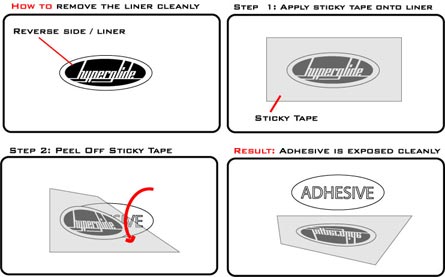
Click image to view larger version
4. Place skates accurately on mouse feet
It is essential that you stick the skates only one time as this ensures good adhering. The adhesive will lose strength if you pull the skates off the feet after sticking.
5.Apply firm pressure to skates for 30 seconds to create a lasting bond.
|



)

